Chaos
Back to Chaos website
Contact Support
Sign in Try Buy
Keep Enscape running smoothly. Switch to the latest version in 3 simple steps. [Update Now]
  1. Chaos Help Center
  2. FAQ
  3. Product Articles
  4. V-Ray
  5. How to

Where I can find my Ticket/Request ID number

Updated June 05, 2023 13:46

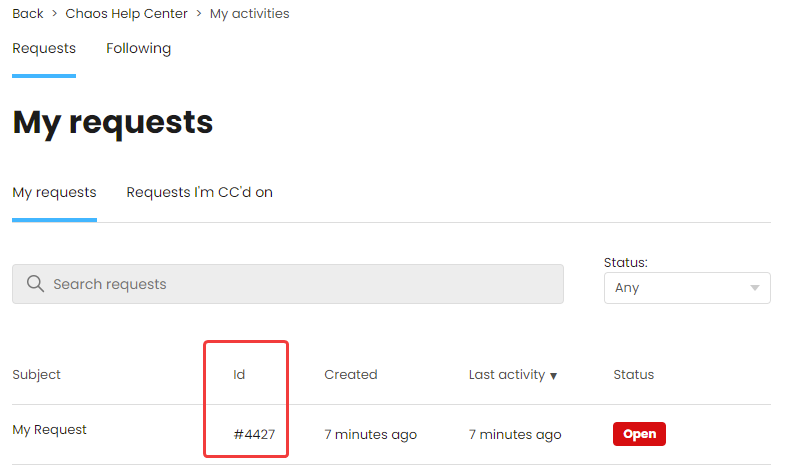
You can find the Ticket/Request ID number in the My Activities > My requests section of Chaos Help Center.
 

mceclip3.png

Example of Ticket/Request ID in Chaos Help Center.


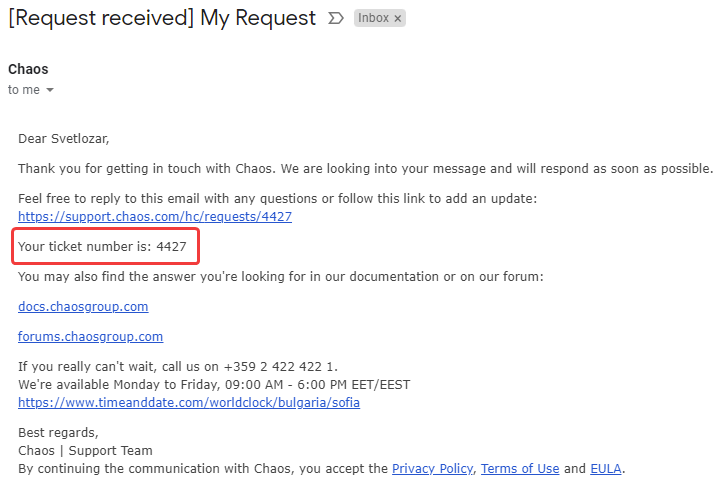
You can also find it in the email notifications sent by our system:
 

mceclip2.png

Example of a ticket number in an email notification.

Was this article helpful?
0 out of 0 found this helpful

Articles in this section

  • V-Ray Render Settings Explained - Quality vs. Render Time
  • Understanding the Gaussian Splat PLY formats
  • Working with the 3ds Max color management (new OCIO defaults)
  • How to Create Image Sequence with V-Ray for SketchUp and Rhino?
  • V-Ray 6 for Rhino embedded textures size changes
  • How to enable and control Depth of Field (DOF) in V-Ray for 3ds Max?
  • What DPI should I use for my renders?
  • How to upload files to Chaos Support
  • Optimizing Distributed rendering
  • How to create a 3-way lenticular material where the texture changes depending on the viewing angle?
See more