
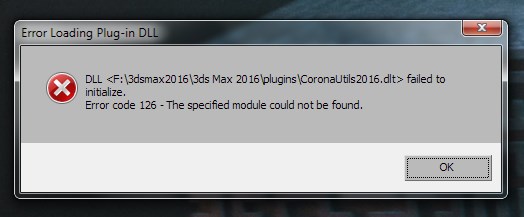
Solutions:
1. Make sure that Corona is installed properly.
Either copy all the required files manually or run the universal installer.
See: How to install Corona manually using the "unpack files" option?
2. Install all available Windows Updates
Link: Install Windows Updates at Microsoft Website
Note: restart your PC after installing all updates available on the list, and check for updates again - if new ones appear, you will need to install them again. Sometimes it is required to repeat this several times.
3. Uninstall (this is required!) and then install again Microsoft Visual C++ Runtime Libraries.
Link: How to remove and reinstall Microsoft Visual C++ Runtime Libraries at Microsoft Website
Note: you may need to restart your PC after the whole process is finished, and then re-install Corona Renderer
See also: Error code 127 - Procedure not found