
During your work with Enscape, you might encounter the following message:
"Import Failed
An error occurred while importing materials. Some materials could not be imported."
To address this, try the following approach:
If you've renamed or otherwise switched account names, please remap the imported texture path to a valid location. Additionally, please make sure this folder is available and you have the corresponding user right to access it.
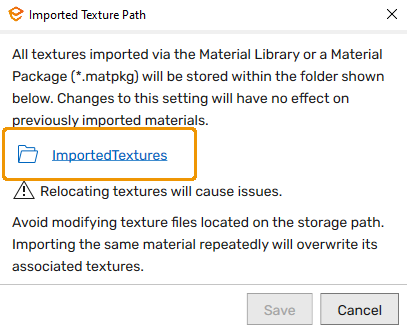
To do this, open the Enscape Material Library and then click the "gear" icon in the lower left-hand corner. This will open the "Imported Texture Path" dialog box. Click the "folder" icon and map the save location to a valid folder of your choosing. Then hit "Save" to close the dialog box.


For more information, please refer to our article Enscape Material Library on our KnowledgeBase.